
Help Centre / Using Your Dashboard
Reading your monthly report
At the end of each month you receive an email that recaps your results: who we reached, who was interested, who we connected with you, and who we'll reengage next month.
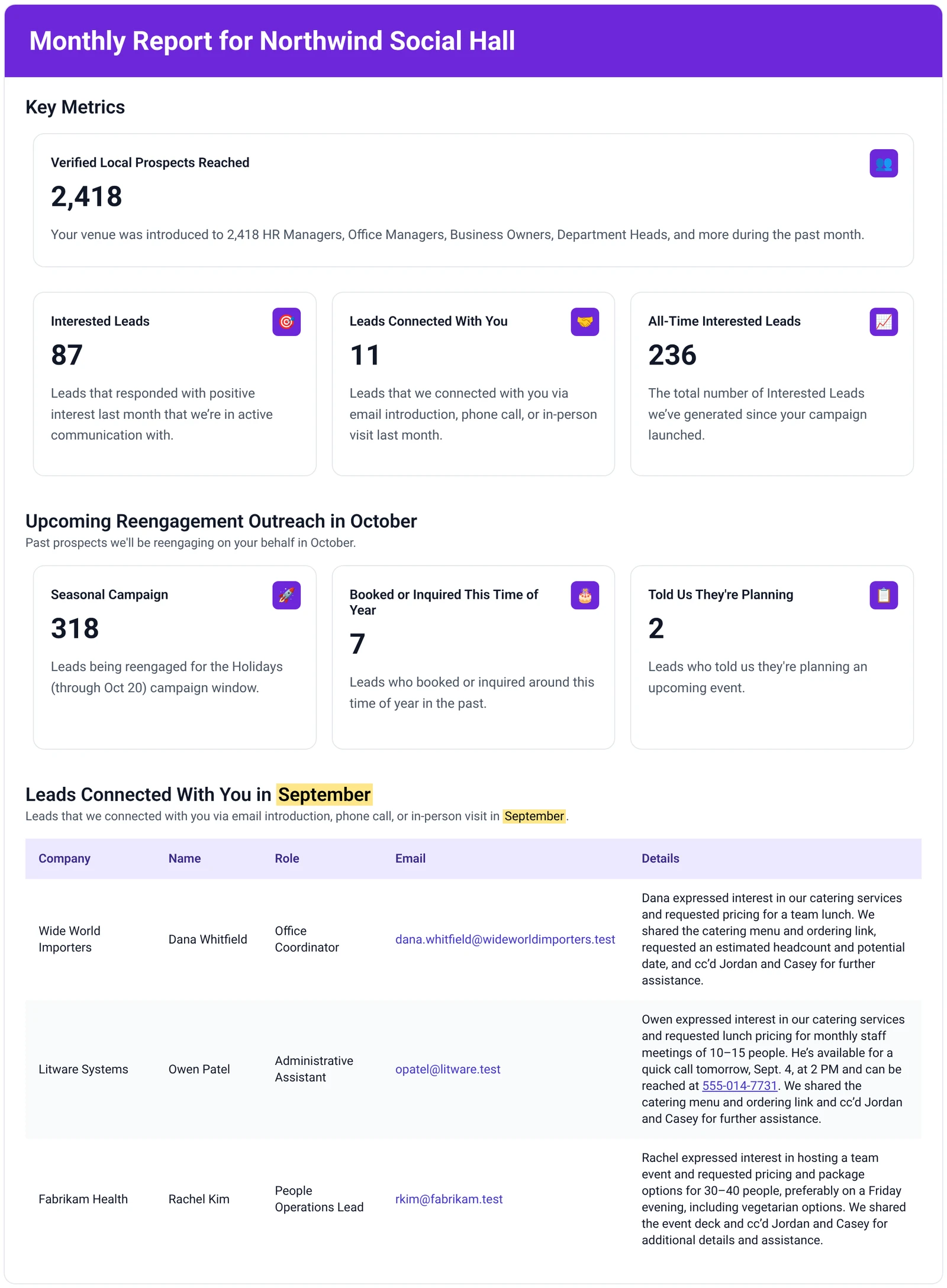
When it arrives
At the end of each month, you receive a recap focused on outcomes. It is a full monthly summary of performance, not just weekly snapshots combined, and connects outreach to real conversations and event opportunities.
To choose who receives report emails and meeting notifications, see Venue-wide settings.
Key metrics
The top of the email shows four numbers for the past month.
| Number | What it counts |
|---|---|
| Verified Local Prospects Reached | The decision-makers your venue was introduced to last month, such as HR managers, office managers, business owners, department heads and more. |
| Interested Leads | Leads who responded with positive interest last month and that we're in active communication with. |
| Leads Connected With You | Leads we connected with you last month by email introduction, phone call or in-person visit. |
| All-Time Interested Leads | The total number of Interested Leads we've generated since your campaign launched. |
Upcoming Reengagement Outreach
This section, titled "Upcoming Reengagement Outreach in" followed by next month's name, shows the past prospects we'll be reengaging on your behalf next month. It's split into three groups:
- Seasonal Campaign: leads being reengaged for the current seasonal campaign window, for example the Holidays.
- Booked or Inquired This Time of Year: leads who booked or inquired around this time of year in the past.
- Told Us They're Planning: leads who told us they're planning an upcoming event.
You don't need to do anything with these numbers. Replies come through like a new lead: our team handles the first response and hands them to you when they're ready. See What re-engagement sends.
Reengagement leads in your dashboard
You don't have to wait for the monthly email to see these leads. The same reengagement leads are available any time on the Reengagement page of your dashboard, grouped by the quarter they're most likely to book in.
- Leads who told us they're planning an event are placed in the quarter they mentioned in the thread or the survey. See How a lead gets into re-engagement.
- Leads you've booked (and marked as booked) are scheduled for the following year, so they come back around this time of year.
- To see who is coming up for a season, filter the list by quarter, event type or company. See Using the re-engagement list yourself.
From the same page you can also send a bulk email directly, once your inbox is connected with sending turned on.
Leads Connected With You table
The last section, titled "Leads Connected With You in" followed by the month, lists every lead we connected with you that month by email introduction, phone call or in-person visit. For each one it shows:
- Company, Name, Role and Email
- Details: a short summary of what the lead asked for and what we shared with them, such as a menu, pricing or your event deck, and who on your team we cc'd.
It's a complete record of the opportunities handed to you that month. If one of these hasn't been followed up yet, reply in the original thread using Reply All.
Can't find what you need? Reply to any email from your Event Captain team and we'll sort it out.